iPhone Calendar Virus is a term used to describe Apple OS spam that adds fake subscription calendars to a user’s device without their consent. As a result, the victim receives event notifications containing suspicious and possibly malicious links.
Spammers can start flooding you with fraudulent events once they get your email address, which is where your calendar is associated with. This can lead Apple users to think their phone has been hacked. In reality, these events occur because the app uses indiscriminate tactics to add subscription calendars that you are invited to, without any filter. However, you can also allow this infection to your mobile phone by clicking on a suspicious online advertisement. Fortunately, you can delete all the spam by following the simple instructions we provide.
The calendar virus on iOS devices is not technically complex and you can remove it quite easily.
Unlike traditional malware, it does not require complex programming or scripts to infect users’ devices. Instead, spammers have discovered a flaw in the Calendar app that allows people to be invited to events via their email address and add those events to their apps without any approval. Therefore, any spammer who has access to your email address (which can be obtained from various data leak databases on the Dark Web) can infect you with the Apple Calendar virus and send you spam on a daily basis.
The iPhone Calendar virus spams the app with fraudulent and annoying events and sends notifications to the user.
iPhone calendar spam is distinguished by the URLs included in them and suspicious titles. Examples of what some of the events might look like:
- Click NOW to Secure your iPhone;
- Your iPhone Might Be Exposed to Viruses!;
- iPhone XS Max is Here, Pick it up or Choose Delivery Options;
- Kate Sent You 5 Pictures;
- Hackers might try to take control over your iPhone! Click now to stay protected;
- Easy Car Loans – Apply Online;
- Your iPhone Has Been Hacked;
- Cyber-Monday: Ray-Ban Only 9.99 and similar.
Generally, these events aim to attract the victim’s attention and arouse curiosity with too-good-to-be-true deals, or warnings about the device’s security status. It is observed that most of the calendar spam is used to advertise sites like ectsdividuallyalb.info, urgent-notice.com, fd5.info, rb-buy-shop.com, important-notices.com and others.
It goes without saying that you should never click on these links to visit the advertised websites. You may be redirected to potentially dangerous, insecure or even malicious websites that may try to steal even more personal data or cause you financial losses. However, remove the virus and similar calendar spam attached to your email using the instructions given below.
Security researchers warn of Mac and iPhone related scams that are happening. Some examples of this are $750 Cash-App-Transfer awaiting your confirmation, AMARKTFLOW or your iPhone is hacked. We strongly recommend that you learn more about such scam schemes so that you can easily avoid them.
Ways You Can Get Mobile Viruses
The iPhone Calendar virus can infect you through several scenarios. First, your email address can reach spammers in some way, for example, due to a data leak or if you enter such information yourself on dubious websites.
Secondly, you can get such a virus by clicking on suspicious pop-up ads or interacting with dangerous websites. Such fraudulent ads usually have attractive titles to force the user to click on them. Unfortunately, such actions can trigger scripts that will infect your device or change its settings. Even worse, you may encounter the VIRUS ALERT FROM APPLE scam. However, we suggest that you carefully follow the provided guide to remove viruses like iPhone Calendar.
Remove iPhone Calendar Virus Easily
Delete Fake Calendars
To delete iPhone Calendar Virus and the spam it causes, follow the instructions given below. The first method explains how to delete fake calendars added to your phone by a third-party app.
- Sign out on the latest versions of iOS
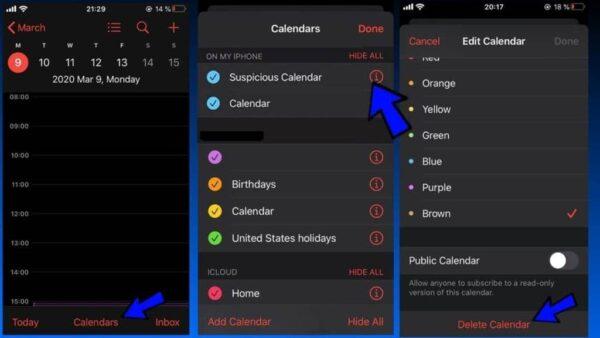
- Open the Calendar app from the Home screen.
- Then tap the Calendars button at the bottom.
- You should now notice a section called On My iPhone with a few suspicious calendars listed under it. The calendar will be highlighted in a color that corresponds to those annoying events you are seeing.
- Tap the i button next to the suspicious calendar.
- Now tap Delete Calendar. Then tap Delete Calendar again to confirm.
Sign Out on Older iOS Versions
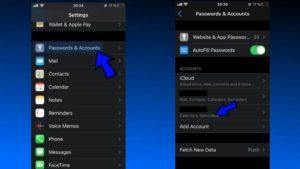
Open the Settings app and then scroll down a bit until you see Passwords & Accounts. Open it.
Here you should see the Accounts subsection. Find the suspicious account that has access to the Calendars app. You may see a name like “Subscribed Calendars”, “Other Calendars” or something similar.
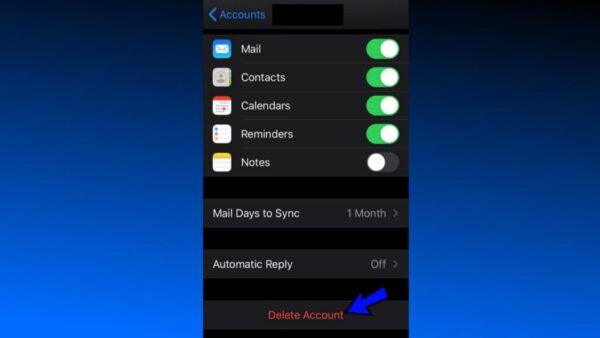
Open the suspicious account and select the Delete Account option at the bottom. If prompted, confirm your choice.